

Select Page
2023 – Present
Training quarterback decision-making, one mental rep at a time.
I helped turn an NFL coach’s idea for a 3D quarterback simulator into a connected training platform designed to teach players how to read defenses, make decisions under pressure, and improve through repetition
autoplay muted loop playsinline webkit-playsinline preload="auto" style=" width: 100%; height: auto; display: block; " onloadedmetadata="this.muted=true; this.defaultMuted=true; this.play();" >

Role

Creative Director / Lead Product Designer

Scope

Product Strategy
UX/UI
Interaction
Prototyping
Brand

Platforms

iOS & Android
Web
Unity

The Idea

What if quarterbacks could get mental reps anywhere?

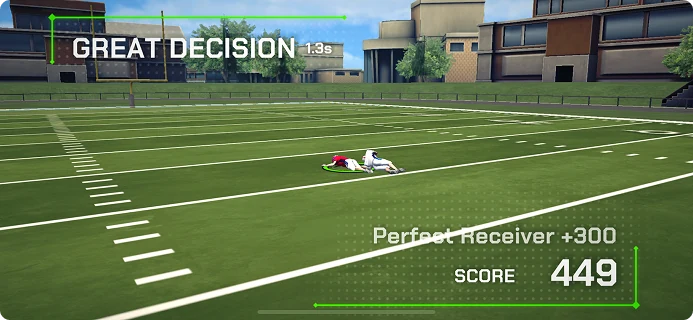
An NFL offensive coordinator came to us with the seed of an idea: what if quarterbacks could watch a play unfold in a 3D environment on their phone, read the defense, and choose where to throw?

The initial proof of concept was closer to a video game than a training platform. Our job was to figure out what it would take to turn that idea into a tool that could actually help quarterbacks improve.
The Original Hypothesis
See the play → Read the defense → Make the throw
Domain Immersion
Making the throw was only the final step.

I came into Crucible knowing very little about the mechanics of quarterback decision-making. To design the experience, I first had to understand how quarterbacks actually learn.

I worked closely with our NFL coaching partner, observing how he worked and interviewing him about how quarterbacks prepare, read defenses, and make decisions. He also connected us with other coaches and quarterback specialists who helped us understand how those skills were taught at different levels of the game.

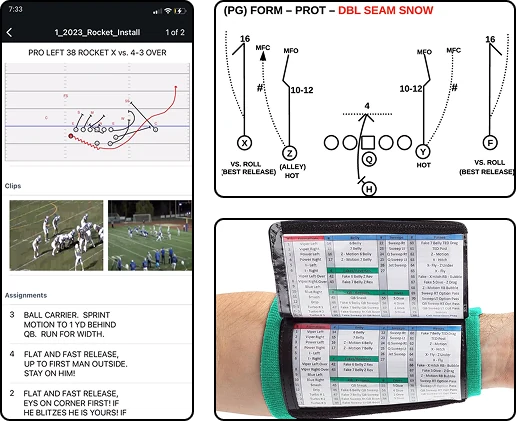
A quarterback is taught where to look.
Reading the field isn’t arbitrary. Players learn to identify defensive coverage, key off specific cues, and work through a progression based on what the defense gives them.
Every playbook has its own language.
Teams can use entirely different terminology for similar concepts. Training had to reflect the player’s actual playbook—not ask them to translate it into ours.
Static diagrams only go so far.
Whiteboards and diagramming tools could show where players were supposed to go. We wanted quarterbacks to practice making the decision while the play was actually unfolding.
FROM KNOWING → DOING
Turning quarterback decision-making into something trainable.
The opportunity wasn’t simply to help players memorize more plays. It was to give them a way to repeatedly practice the mental process behind executing them.
READ
Identify the coverage
Read the defense and understand what you’re facing.
Progress
Scan the field
Work through the play’s progression based on what the defense gives you.
Decide
Select the Receiver
Identify the correct target before the window closes.
Repeat
Build the instinct
Get feedback, reset, and run the decision again.

Research.

Challenge

Customer feedback existed everywhere, but it was fragmented across teams and tools.

Support, Sales, Product, and UX all developed different perspectives on what mattered most because each team interacted with customers in different ways. I wanted a way to bring those perspectives together into a single, evolving understanding of our users.

My approach
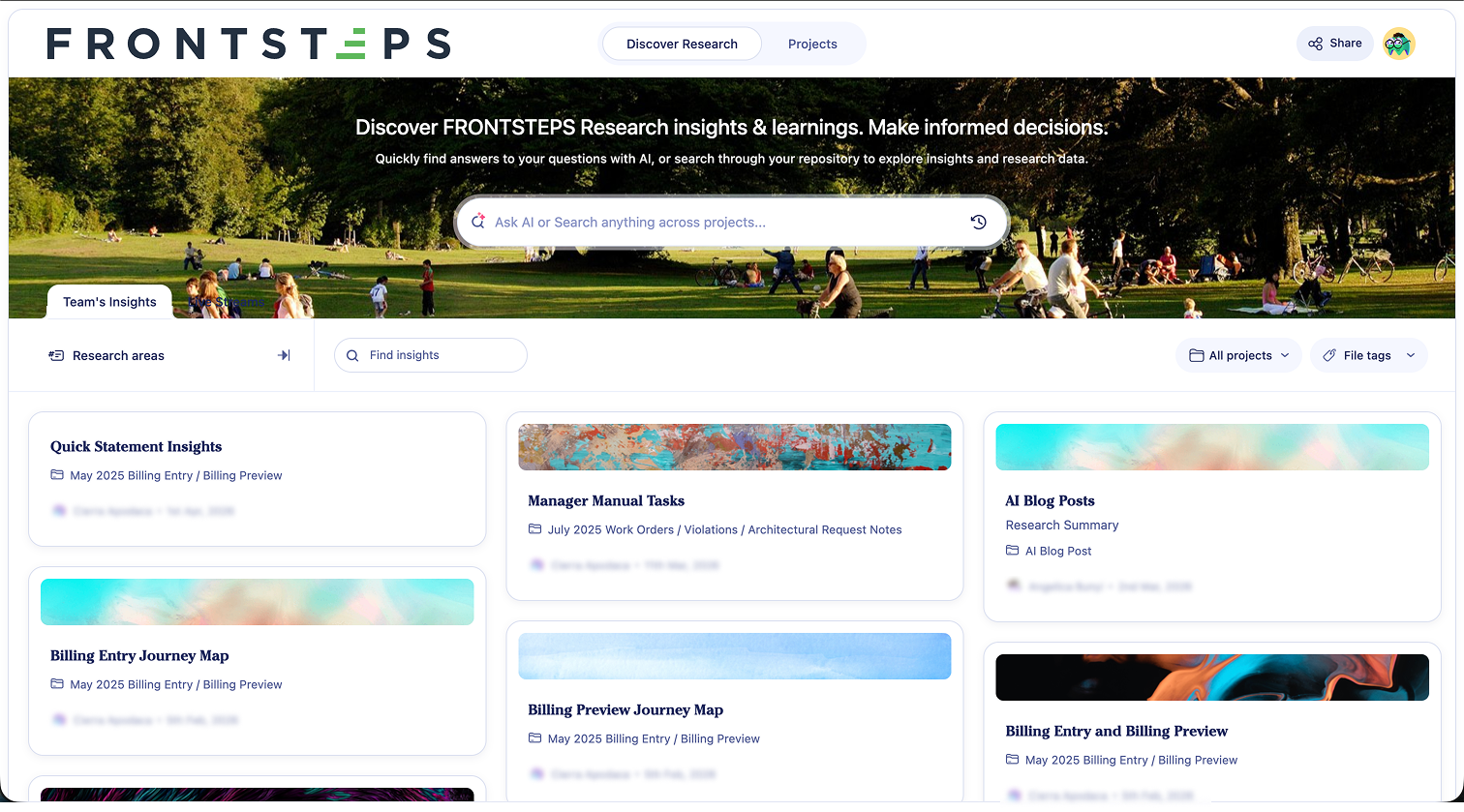
A new way of working

Research lived in reports
Customer understanding became continuously accessible.
Teams relied on memory
Teams explored evidence together.
Research questions became follow-up tasks
Questions could be answered during the meeting.
Decisions were shaped by individual perspectives
Decisions became grounded in customer evidence.

Questions we could answer

"What are the biggest pain points across our customer base?"

"What evidence supports this roadmap initiative?"

"Can you surface quotes from customers struggling with this workflow?"

"How do support conversations compare with our interview findings?"

"Has customer sentiment changed since we last worked on this feature?"

"Which problems consistently appear across support, sales, and UX research?"

Example

Resident Login AI Assistant Strategy

Resident login consistently surfaced as one of our largest sources of support requests. Our initial assumption was that residents were simply forgetting usernames and passwords.

Looking across support conversations, customer interviews, sales calls, and product demos revealed a different story. Login wasn’t the real problem. Residents were struggling to understand how their community worked digitally—which portal to use, what they could do there, and how to complete common tasks.

That shifted our strategy from improving authentication to improving guidance.

Rather than building a better login flow, we explored an AI assistant grounded in each community’s documents, rules, and processes. Instead of simply helping residents get into the platform, it could guide them from their first question through task completion while reducing support requests for both residents and property management teams.

The problem wasn’t helping residents log in—it was helping them accomplish what they came to do.

Outcomes

Shared customer understanding
Evidence-driven roadmap discussions
Real-time research synthesis
More objective product decisions

Design systems.

Challenge

Traditional design systems help designers and engineers build consistent products. As AI became part of our workflow, I realized our documentation also needed to support the tools our teams were beginning to use.

Without clear standards, AI-generated interfaces were inconsistent and often required significant refinement before they could be used.

My approach

Before changing our documentation, I partnered closely with engineering to understand how our components were actually built—from tokens and naming conventions to implementation patterns and technical constraints.

Using those insights, I redesigned our design system around a single goal: helping both people and AI understand not just what to build, but how and why components were used.

Tooling

Figma

Claude Design

Markdown

Design Tokens

Building an AI-native design system

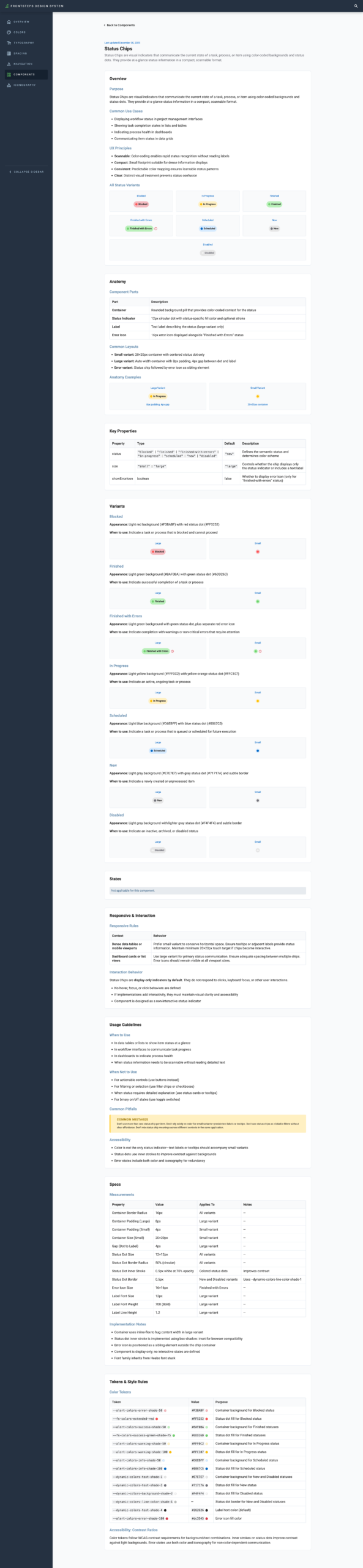
Usage guidance

Human-readable and AI-readable documentation.

Component API

Explicit variants and properties that AI can reliably reference.

Implementation guidance

Design intent alongside engineering considerations.

Design tokens

Shared language between design and engineering.
Outcomes

A shared design language
More consistent implementations
Higher quality AI-generated prototypes
Less time refining generated work

Working together.

Challenge

AI quickly became part of everyone’s workflow, but everyone was using it differently. Designers, product managers, and engineers were each developing their own habits, making it difficult to share context, build consistently, and learn from one another.

My approach.

Rather than treating AI as an individual productivity tool, I worked to make it part of our team’s shared workflow.

By documenting processes, building common resources, collaborating closely with engineering, and encouraging experimentation across disciplines, we established a more consistent way of working that everyone could build upon.

How we worked together

Research had to be rediscovered
Research was instantly accessible.
Product knowledge depended on memory
Product knowledge became searchable.
Prototypes started from blank canvases
Prototypes started from shared systems.
Meetings established context
Meetings refined solutions.

What changed

The biggest shift wasn’t that everyone started using AI—it was that everyone started from the same foundation. Product managers, designers, and engineers could build on shared product understanding, customer research, and implementation guidance instead of independently gathering information before every project.

That changed where we spent our time. Instead of rebuilding context, we could focus on evaluating ideas, refining experiences, validating decisions, and moving products toward production with greater confidence.

Stronger cross-functional collaboration
Shared AI workflows
More consistent product decisions
A more scalable design practice

Let's Chat